iDrive Online Backup Review

ProsIDrive is a proven online backup provider with a rich set of tools to backup your files
ConsExpensive and out of date design
Bottom LineIDrive is trying to adapt to the 'new rules' of online backup, but they are not quite on par with the competition. That being said, IDrive has a great feature set like advanced backup and versioning.
Editor review
Easily take control of your online backup
Installation:
It is pretty easy to get started. The only issue I had with the installation was accidentally selecting the install for Mac instead of PC. If you make the wrong operating system it will make you sign up again to change the selection. This process can be confusing and should be fixed. But, if you make the right selection the first time, it will work out fine.
Configuration:
The software is better than other backup software in terms of functionality. I was simply relieved to see options like auto throttle, scheduled backup and more. A great design feature is that they simplify the backup and restore process. The opening tab is the selection for backup and there is an obvious tab for restoring which makes understanding the process easy for everyone.
The software allows the user to feel in control. For the most part it's not too technical. If you view the error log, for instance, it will read in a way that anyone can understand. So, if you take the time to figure out what you need, the software is a great tool.
Data Backup Process
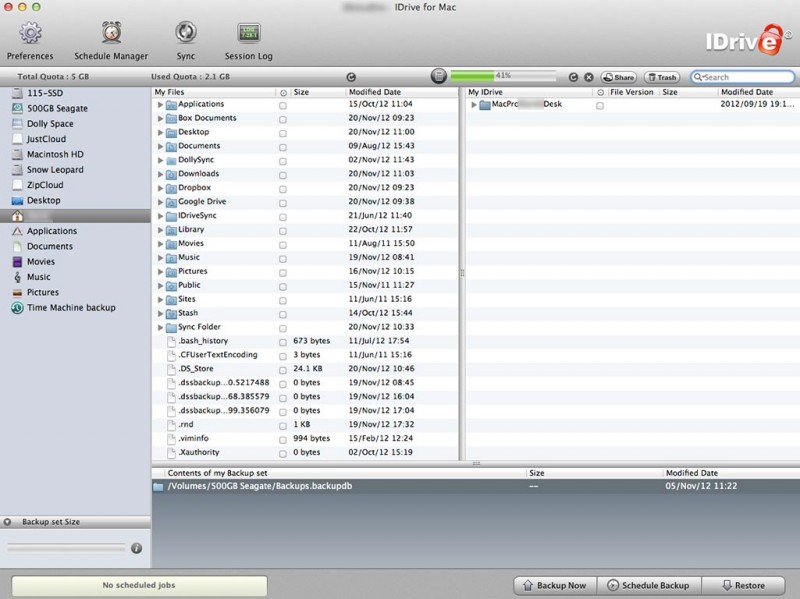
IDrive’s backup is simple for users who have worked with folder hierarchy. It looks like Windows XP’s Windows Explorer or Mac’s Finder when you are browsing through documents. The only issue that some people may have would be trying to search for files. This process could be easier, but it’s still works well for me.
The options are great for backing up. They include scheduled backup, continuous backup, and backup now. In the options you can select daily, weekly or monthly backups with notifications on your computer or sent to your email when a backup has been started or if an error occurred.
Also, if you go into advanced settings there are more selections to make the backup run smoother. This is not the case for many other online backup applications.
Data Restore Process
Restoring files is just as easy as backing them up. It follows the same folder structure and allows for easy access. Depending on your Internet speed it can be fast or slow. Ours is pretty fast so there was not an issue.
One option that is really nice is the “Open IDrive Exporer” option in the tools menu. This lets you download a plugin from IDrive that enable a mode that looks just like a Windows Explorer window. This allows you to operate with an interface that is familiar looking like the rest of the your computer folders and files. Once installed and restarted, the plugin allows you to drag-and-drop files from your IDrive online backup to your computer.
Accessibility
when you go to their website, sign in and you will see your files. It’s really easy to retrieve your files online. The mobile apps are good. You can use your existing account to backup your phone’s Contacts or Photos. There is not a way to see other files from your computer or other devices. It’s good for backing up your phone but does little in terms of accessing your computer files from your phone.
File Versioning
IDrive handles file versioning very well. It’s done in a time line fashion. You can select up to 30 different forms of the same file. Or you can view your backed up files per backup by selecting “Timeline Restore”. This is helpful in determining at what time you backed up a file.
Conclusion
If your looking for more control over your backup and like knowing support is easily accessible then IDrive is a great choice. It’s better at functionality and setting control than it is at cloud storage or syncing.
Pros and Cons
Easy to get started
Great performance
Easy to access online
Options can be overwhelming
User reviews
Personal Backup Plan
Business Backup Plans
Support Options


Notable Features:
- Very responsive tech support. Typically answer the phone on the first or second ring
- Easy to use desktop client which works on Windows and Mac
- Mobile apps for iPhone, iPad and Android
- Scheduler, Auto-backup selection, Versioning, Incremental Versioning
- SSL Data Encryption on Geo-Redundant Storage
Company Highlights:
IDrive is one of the best single user through small business backup companies out there. They provide simple software that is well-balanced with helpful features. They have great experience and customers recommended them highly.
View All iDrive Prices & Plans
IDrive Company Info:
IDrive online back services are offered by Pro Softnet Corporation which is a leading internet service provider. Started in 1995, Pro Softnet has provided customized internet features in the field of online backup, storage and remote access.
Headed by Raghu Kulkarni in Woodland Hills, California, this company has won many awards including PC World’s Editors Award in 2006 for providing the best online backup service. This award winning technology is being used in IDrive that provides reliable and secure back for all the files and folders. Extremely user friendly interface coupled with strong logging and scheduling mechanism makes this online backup solution a popular choice with average customers as well as Fortune 100 companies.
IDrive Plans:
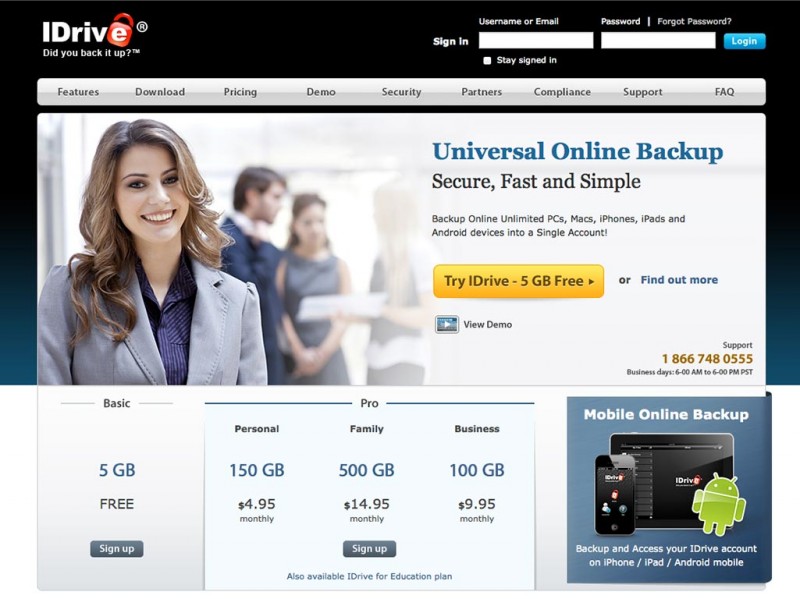
IDrive has plans for individuals and business users:
- IDrive Basic is ideal for individuals and families looking for securing up to 5GB of data that can include photographs, media files or documents in any other format. This plan is currently available for free.
- IDrive Pro is recommended for individuals who want to have a large backup data space can pay just 4.95$/ month for secure 150 GB's data.
- IDrive Pro Family Pack $14.95/month for 500 GB's of storage space and backup of up to 5 PC's
- IDrive Pro Business is $9.95/month for 50 GB's on up to 100PCs
IDrive Online Backup Features:
Prominent features of IDrive services:
- Schedule automated backup of all the critical data using a built-in timer
- Faster backup of data after full initial backup by using incremental backups
- File version for up to 30 latest file iterations makes it easier for the users to find historical file versions. Also the final version of data storage space is accounted for; historical data backup is free
- You can even backup the data from the mapped drive
- This backup service doesn't hamper the systems performance with features such as auto-pause for stopping and resuming backups when the system is not busy. An option is also provided to control the bandwidth usage
- 128 bit SSL encryption is used during data transfer and 256 AES encryption is used at storage site for enhanced safety. All users are provided with unique password key that is not stored anywhere on IDrive servers
IDrive Support:
For any help or query, the customer care executive can be contacted during the weekdays from 6 A.M. to 6 P.M. by dialing (866) 748-0555.
- Phone Support: Yes - Monday - Friday, 6:00 AM to 6:00 PM PST
- Email Support: Yes
- Ticket System: Yes
- Live Support Chat: Yes 24/7
- FAQ & Knowledge base: Yes
- Video Tutorials: Yes
- Feedback Form: Yes
Conclusion:
IDrive online backup tool with user friendly interface to get information on backed up data and storage logs is an extremely cost effective option for saving precious information that can be used by both Windows and Mac users.
Photos