CloudAccess Review
$9.95

ProsCloudAccess is a perfect host for Joomla. Servers are fast and reliable. Joomla support knowledge is unbelievable. Prices are competitive for the quality service they provide.
ConsHave hosting requirements other than Joomla, CloudAccess may not be the best choice.
Bottom LineCloud Access keeps up with the technical updates allowing you to focus on making the site better. They are true Joomla experts, with fast and reliable servers. You will not be disappointed.
Editor review
A Joomla-focused company that does it right
***Update May 2012***
After several months of using Cloud Access we wanted to follow up and let everyone know we are still happy with our service. The speed is second to none for a shared server, control panel is easy to use and navigate, and tech support is stellar. They are timely and helpful.
A recent example came about when we were trying to get an extension to start working. We submitted a ticket around 9pm EST. With in 30 Minutes we had a response from a technician who had already gone through our site and looked at the problem. When they emailed us back that had a solution for us to try. It worked and even though they are not technically supposed to be responsible with 3rd party extensions they were still able to help me with it.
Their knowledgebase is helpful too. We had to set up a new email for the domain. They use Google Apps and so do we. The tutorial was straight forward and it just worked with no interruptions. This is impressive. Phone support would still be helpful when you have a complex issue that is hard to describe over email. Otherwise we have had nothing but good things come from this company
***Initial Review January 2012***
Sign up and Setup:
We found it easy to register for Cloud Access. The sign up process does not take long but could be shorter.
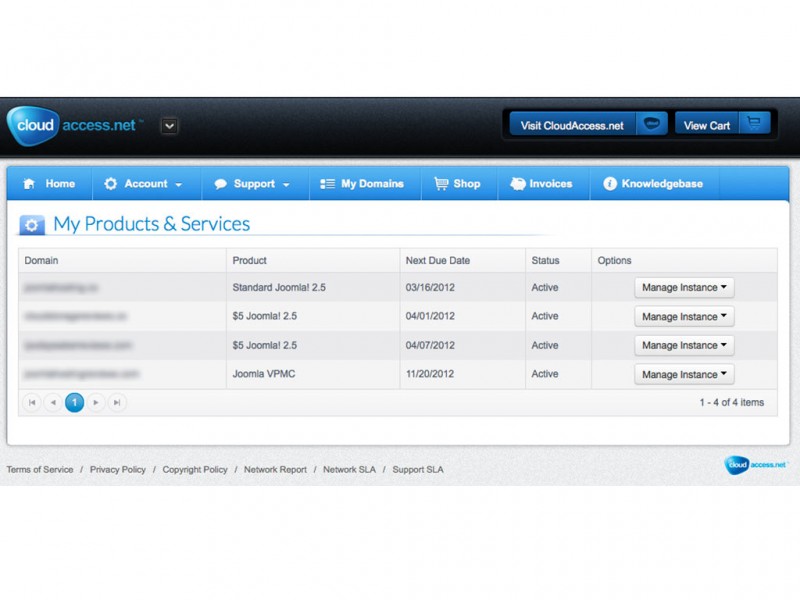
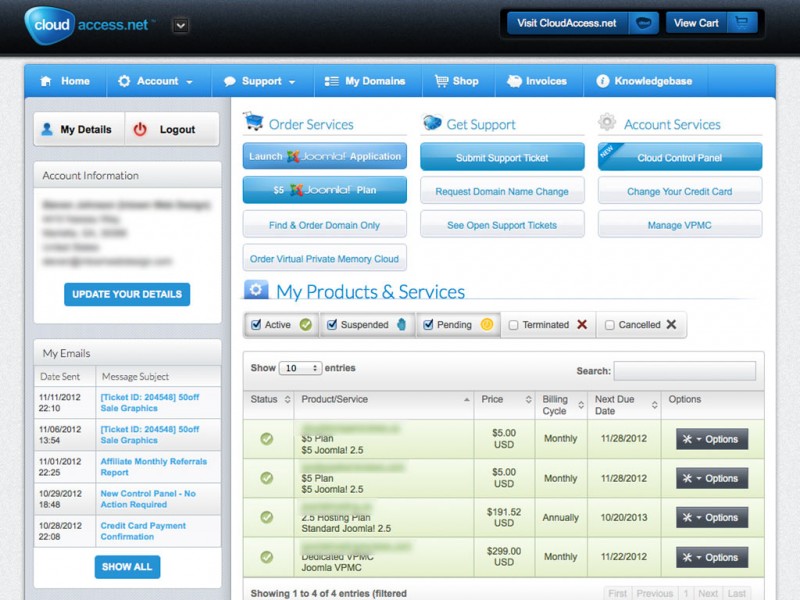
After this is complete, you are taken to the dashboard. Here you can manage account information and buy products. It is clean, intuitive and makes working with Joomla very simple.
Joomla install
To start a Joomla site click, “Launch Joomla! Application”. This takes you to the area where you can demo a Joomla site before signing up with Cloud Access. We chose to use "install an instance of Joomla 1.7".
We clicked “Order Now” to start the demo. In the next screen it asks how we wanted to set up the domain. We chose to use the free Cloud Access domain to start with. Once order is complete you can start using Joomla.
To get there type in the name of the domain you installed Joomla to and you will see the site is already installed and ready to go. Login by using “/administrator” after the domain. You can find your login information in a message sent to you account and email after install.
Using Joomla
We thought getting Joomla up and running was simple and easy. After it was set up and we were logged in, it was just like any other Joomla administrator backend.
What makes Cloud Access different is they have a custom control panel pre-built into Joomla. It comes with several different options that are worth mentioning.
Resources:
In this section you can see plan related statistics like monthly bandwidth, disk space usage, and email usage. There is a tab that expands the bandwidth into a daily view to make it a little more detailed.
Backup:
This section utilizes a component called Akeeba Backup. It is the industry leader in Joomla backup. Cloud Access Incorporated this into their control panel, so no need to install it separately.
PHPMyAdmin:
One of the more unusual tabs to see inside of Joomla is PHPMyAdmin. This holds your Joomla databases accessible directly from the Joomla backend. This is very unique and not a standard practice.
Clear All:
This is a one tab tool that’s sole purpose is to delete everything. It works great for deleting sample data that is installed with Joomla.
These control panel options are pretty cool. Cloud Access run most of the Joomla extensions that we run on our sites, but we think they could include more. Having builtin backup is great and being able to access the database right from Joomla does save a lot of time. Other tools included in the Cloud Access control panel are Domain DNS, Domain Aliases, and Cron Jobs.
We like the built-in Joomla control panel, but think it is limited to the more advanced users. Using a service like Cloud Access is great assuming that you would rather have them be in control of the technical side instead of you.
Using Templates
On the front end of Cloud Access head over to the Templates section. If you purchase a Cloud Access hosting plan all of the templates are free and they will install them for you.
Another aspect of using Cloud Access that we like is that they will install any 3rd party templates for you for free too. In order to use this service, purchase one of the plans and then search the internet for any template you want to use. Email them and they will install it for you.
Speed
Cloud Access is really fast. Publishing a page in Joomla takes less then a second. We found it to be seamless, without any interruptions or issues. Cloud Access keeps things fast by having top notch server environments.
We think their speed is great, but we did wonder why they did not include a caching plugin as part of their Joomla bundle. This is something we will be installing to any of our Joomla sites. Caching speeds up webpage delivery by a lot. Also, we think a builtin plugin that allows easy access to a CDN would be an improvement.
After following the server response times for a few days using Pingdom, we found that Cloud Access' Servers are very fast. They delivered our test page below 800ms. That is great speed for shared hosting.
Support
We got help from support almost instantly. Even with only a demo site running, tech support gave us a quick response. We asked them if there was any way to not install Sample Data when Joomla was installed. They replied that their Joomla Configuration included Sample Data. We thought they could have mentioned their “Clear All” that will delete all menu items, modules, articles and categories. This gets rid of the Sample Data after install.
Conclusion
Cloud Access handles everything Joomla related to their web service. You don't have to install anything and you can pick from a bunch of pre-built templates. They have a great control panel, their speed is incredible and a great Joomla tech support staff. They could have phone support for even better support, but we have been doing just fine with what they have given us to work with. We highly recommend running your Joomla site with Cloud Access.
Pros and Cons
Fully supported Joomla integration
Free templates
Easy backup
Quick support
Could include more plug ins with pre-configured installation
User reviews
By far one of the best hosting companies
With full conviction I can recommend Cloudacces to you as beeing a top notch service provider.
Pros and Cons
In terms of price/performance/quaulity they are the best. I am not a Techie, so once in a while I need support on hosting issues, mail issues and Joomla issues. They are alway willing to help and there has been no occassion the could not help me.
Excellent Support
I have been with them for over four years now. Get offers all the time for cheaper hosting services. As long as they keep offering great support and service, I won't ever consider switching providers. I recommend them to every client if we don't host for them.
Pros and Cons
Highly Recommended!
I'm an entrepreneur needing Joomla to run my publishing websites. Nice not to have to worry about Joomla issues and hosting problems.
Pros and Cons
For the price they charge and the performance they give, could one ask for more?
They were producing great extension webinars, seem to have stop lately, would be great to see more on new components and plugins.
Super Service
Excellent service. Haven't had a more cooperative vendor
Real helpful host.
Really great team to work with -
Pros and Cons
Great support desk - that is not trying to upsell - but reads your issue and gets the right person on it
Price
+1 to Cloudaccess
Perfect Hosting service for Joomla webmasters!
Pros and Cons
Server response - fast
Loading time - fast
Support - Fanatical
Price - Cheap
overall quality : 10/10
It's all about Support when it breaks...
Service is the Key... I believe it was worth it and it continues to payoff here...
Pros and Cons
- Always Up to Date as Joomla evolves
- Fast and Consistent Service even if it is not their fault
- Good for Newbies on a Business Site
- They Focus on Joomla and are Joomla Experts
- Best for Do It Yourself Business Owners
- Support is worth the Price if you are Learning and not a Programmer
- Price is Higher
Uneven support
I am an IT consultant and Joomla beginner based in Sweden. About CloudAccess:
Technical support: my simple beginner's questions have been answered very quickly, indeed. However, at least once I have received a meaningless response. (However, this was answered correctly by another support person after my "please, read again" mail.)
Administrative support: the transfer of my client's domain from a Swedish web hotel to CloudAccess and at the same time buying a support plan for it, was a horror. After a number of "yelling" e-mails (which I hate to send) and something like 2 weeks, they finally made it.
When the present 12 month support plan comes to an end, I might move this site to another web hotel. In the future I hope to sell new Joomla based sites to new clients, and have no wish to repeat this episode.
PS Sadly, the NSA snooping also adds to my desire to move to a more protected web hotel: my client has no secret information, but you know the irritating feeling of sitting with a newspaper when someone is reading over your shoulder!
Pros and Cons
Technical support: very quick.
Technical support: not first class
Truly Insane Support!!
I have transferred all hosting needs to Cloud Access. I am valued in my company all because of their behind the scene support:))
Pros and Cons
Cloud Access Great
Cloud access great features are easy to use i have no idea about hosting or to upload a website file using FTP i search from the other online resources but i always failed to follow their horrible long instruction. But thanks to this site along with the guys they are patiently assist me, and i can rely with their support at any time. More power to Cloud Access you made such a great help especially for a freelancer like us to show our project online to our client.
Pros and Cons
Johnathan is the man
The gentleman that has been helping me with customer service has been significantly helpful. He gave me his direct line and I "never" had to wait to be helped. I am a beginner to the wonderful world of joomla and the people of joomla make it worth every cent. I came across joomla from a friend of mine that works with marketing for a major retail store and he uses joomla quite often and has had major success because of its ease of use and wonderful customer service. This stuff is a "hit"!!... Highly recommended. You can train a monkey to use Joomla. Neat, Simple, Easy and very cheap.
Pros and Cons
Excellent "insane" support
After reviewing comments about CloudAccess hosting, I decided to migrate an important site from other hosting company and give it a try. The first experience is the best so far. I am hopping this is THE hosting company I was looking for.
Pros and Cons
Good Support
I am writing this review to compliment Cloud Access support desk Joomla! assistance. Very helpful and quick and easy.
Pros and Cons
Outstanding Service
I highly recommend Cloudaccess. Give their 30 day trial a try. This is how much I like these guys - if you want, feel free to email me and I'll share my experience with you... jeff dot hunter at accessamericagroup dot com... nuff said...
Pros and Cons
Lost Information
Spent about 4 Hours of joomla development yesterday. Logged on today and the site was down for 5 hours. Customer support was able to restore it but lost all files that were edited yesterday. Would not recommend.
Pros and Cons
Hosting Plan Features
Joomla Features

MySQL Features
Support Options
Company Details
Notable Features:
- Joomla as a service (very easy to use)
- They host demo.joomla.org site
- Over 15,000 New Joomla sites set up per month
- Incredible speeds
- Joomla specialist support
Company Highlights:
CloudAccess.net is a very unique Joomla Hosting Company. They offer Joomla as a service. This means they have joomla installed and setup and waiting for you to make it your own.
View All CloudAccess.net Prices & Plans
CloudAccess Company Info
CloudAccess.net is a unique "Joomla! as a service" website hosting company. They use open source technology combined with web hosting and excellent technical support to make your Joomla site much easier to use.
Because of their expertise in Joomla, they are considered to be one of the best joomla services out there.
CloudAccess Facts:
- Founded in 2008 by 6 members who are still involved
- Located in Traverse City, Michigan
- 30,000 visitors each month from around the world
- Own and operated their own datacenter
- Develop and own intellectual property for cloud hosting with Joomla!
- Have lots of free templates and tools available
CloudAccess Plans and Features:
- Cloud Access Standard - $19.95/Month - Joomla! Instance with Auto updates, phone support, 20GB Disk Space, 2TB bandwidth transfer limit.
- Cloud Access Business - $49.95/Month - Joomla! Instance with Auto updates, phone support, 50GB Disk Space, 15TB bandwidth transfer limit.
- Cloud Access Pro - $99.95/Month - Joomla! Instance with Auto updates, phone support, 100GB Disk Space, 50TB bandwidth transfer limit.
All Accounts Have: No Setup Fees, Professional Support, Managed Backups, Free Email, Free Joomla Templates, FTP/SFTP Access, and more...
All plans backed by CloudAcces’s 45-day money-back guarantee.
CloudAccess Tech Support:
One of CloudAccess main features is their professional Joomla! tech support specialists. They founded the company based on Joomla!’s infrastructure
and open source design, even pioneering some custom tools for Joomla!.
- Email/Online Ticket Support: Yes
- Live Chat: No
- Blog: No
- Knowledgebase: Yes
- FAQs: Yes
- Tutorials: Yes
- Phone Support: Yes
Why to Use CloudAccess:
They are perfect for low maintenance web hosting. CloudAccess provides a great service to make owning a professional-grade website easy. They specialize in getting you started with Joomla! so you are in control of all your data but have great assistance there if you need it.
Photos